The Ultimate System Design Guide: A Deep, Beginner-Friendly Explanation With Real-World Examples
System design is the art of building software systems that are reliable, scalable, and efficient. Whether you’re preparing for interviews, building a startup, or architecting enterprise software, system design thinking helps you create systems that work smoothly even with millions of users.
This guide breaks down every concept in a practical, visual, and easy-to-understand way — with real-world analogies (like restaurants, libraries, highway systems), diagrams (described in text), and examples from apps like WhatsApp, YouTube, Instacart, Uber, and Instagram.
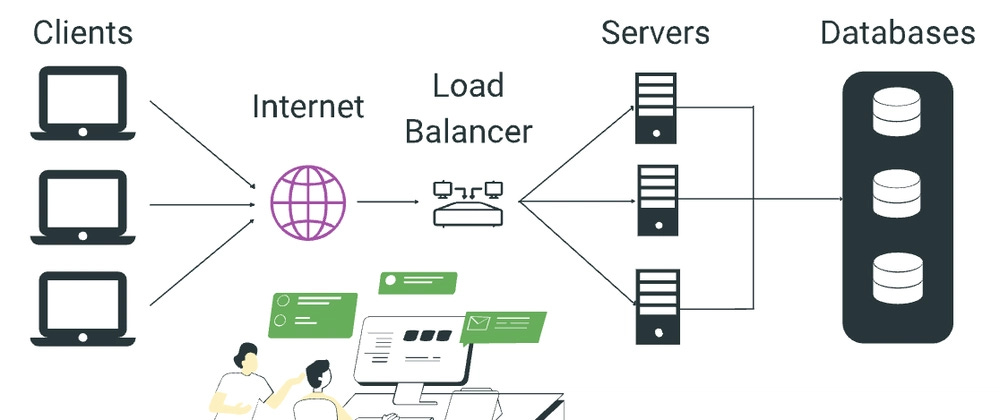
1. What Is System Design? (With Examples)
System design is the process of planning how different pieces of a software system work together to handle user needs.
Think of building a city:
- You need roads (communication)
- Utilities (databases, caching)
- Buildings (applications)
- Traffic systems (load balancers)
- Police/Fire (security, fault tolerance)
If this isn’t planned well, the city will collapse as more people move in.
Similarly:
System design ensures your application works correctly even when many users use it at the same time.
Simple Example
Imagine you’re building a social media app.
- What happens when 1 person likes a photo? → It works easily.
- What happens when 1 million people like photos at the same time? → Things start breaking.
System design tells you how to handle:
- Many users pressing buttons at once
- Large amounts of stored photos
- Notifications to millions
- Handling failures
- Speed and performance
2. Why System Design Matters
Modern software systems like Uber or YouTube must handle:
- Millions of users
- Terabytes of data
- Millions of actions per second
- Peak load events
Without proper architecture:
- The app becomes slow
- Servers crash
- Data gets corrupted
- Costs explode
- Users leave
System design ensures the system is:
- Scalable
- Reliable
- Performant
- Secure
- Maintainable
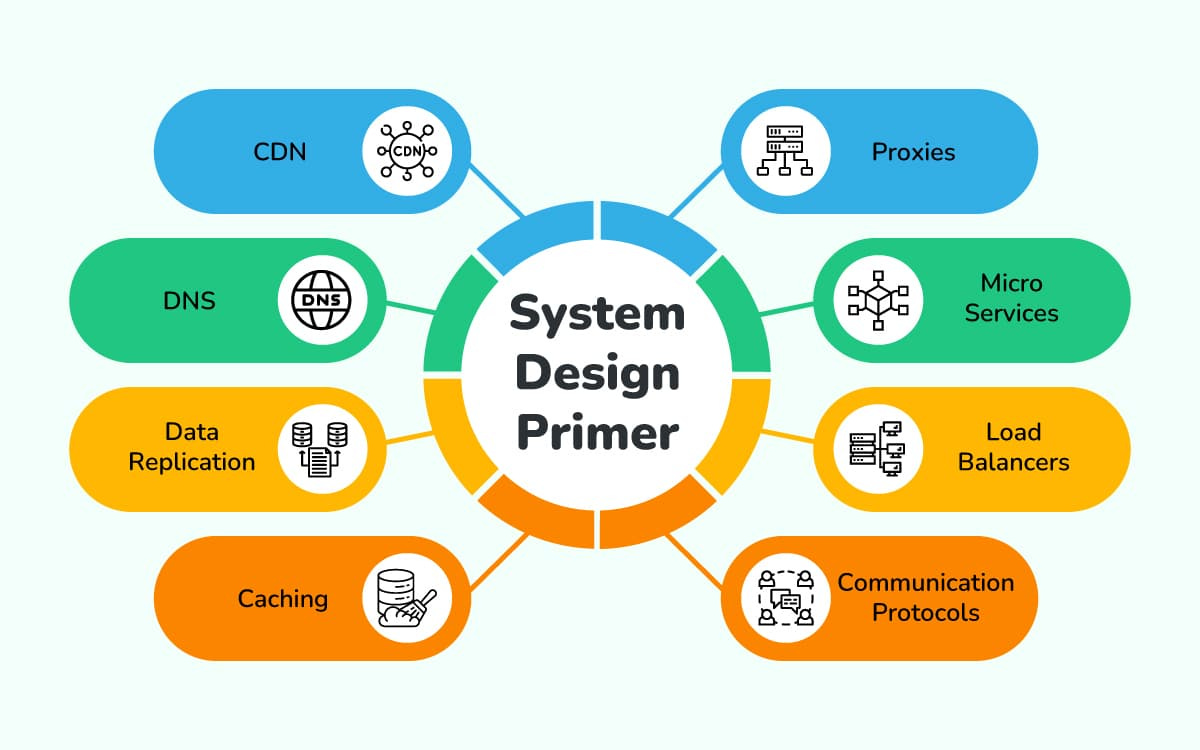
Simple Analogy
- More tea
- More staff
- More cups
- A queueing system
- A payment counter
System design is planning for that 10,000 customer scenario.
3. Understanding the Building Blocks of a Large System
3.1 Client (Browser / App)
- “Send message”
- “Get my feed”
- “Create order”
3.2 API Gateway (Front Door of the System)
The API Gateway is like a reception desk of a large company.
It controls:
- Routing
- Authentication
- Throttling
- Logging
Helps manage millions of incoming requests.
3.3 Load Balancer (Traffic Police)
A load balancer distributes traffic across multiple servers.
3.4 Application Servers
Where the core business logic lives:
- Login
- Order creation
- Profile updates
- Search
3.5 Database Layer
SQL
Examples: MySQL, PostgreSQL
NoSQL
Schema-less, flexible, and good for large scale.
Examples: MongoDB, Cassandra
Replication
Multiple copies of data to increase availability.
Sharding
Splitting large data across different machines.
3.6 Caching Layer (Super Fast Memory)
Caching stores frequently used data in fast memory.
Examples: Redis, Memcached
3.7 Message Queues
Handles background tasks:
- Emails
- OTPs
- Notifications
- Video processing
Examples: Kafka, RabbitMQ
3.8 Microservices
Breaking the system into independent services:
- Payment service
- Auth service
- Notification service
Each can scale and fail independently.
3.9 Monitoring & Logging
Tools track:
- CPU
- Memory
- Errors
- Latency
Examples: Prometheus, Grafana, ELK Stack
4. Core System Design Concepts Explained With Examples
4.1 Latency vs Throughput
- Latency: Speed of one request
- Throughput: How many requests per second the system handles
4.2 CAP Theorem
You can only guarantee 2 out of 3:
- Consistency
- Availability
- Partition Tolerance
WhatsApp chooses Availability + Partition Tolerance → Eventual consistency.
4.3 Consistency Models
- Strong consistency – bank accounts
- Eventual consistency – social media likes
- Causal consistency – chat apps
4.4 Rate Limiting
Prevents system abuse.
Examples:
- 100 requests/minute
- Max 5 OTPs/hour
Algorithms: Token bucket, sliding window.
5. Real System Design Examples (Fully Explained)
5.1 URL Shortener (Bitly)
Requirements:
- Shorten a long URL
- Redirect quickly
- Track clicks
- Handle millions of users
Architecture Includes:
- Hashing
- Database
- Cache
- CDN
- Analytics
5.2 WhatsApp / Messenger
Requirements:
- Real-time messages
- Sync across devices
- Delivery receipts
Uses:
- WebSockets
- Message queues
- Sharded databases
- Offline message storage
5.3 Instagram Feed Design
Needs to handle:
- Billions of posts
- Millions of likes per second
Uses:
- CDN for images
- Cache for feed
- Pre-generated feeds
- Microservices
6. Step-by-Step System Design Approach
Step 1: Clarify Requirements
Functional + Non-functional requirements.
Step 2: Define APIs
Example:
POST /api/login
Step 3: High-Level Architecture
Include:
- Client
- Load balancer
- Servers
- DB
- Cache
- Queue
Step 4: Database Design
Consider:
- Schema
- Indexes
- Relations
- Sharding
Step 5: Scaling Strategy
- Caching
- Horizontal scaling
- Replication
- Queues
- CDNs
Step 6: Bottleneck Identification
Find where traffic may overload:
- Database
- Cache
- CPU
- Storage
Step 7: Security Design
Implement:
- HTTPS
- JWT
- OAuth
- Rate limiting
- Firewalls
7. Best Practices & Principles
7.1 KISS
Keep designs simple.
7.2 Use Caching Wisely
Bad caching can break systems.
7.3 Prefer Horizontal Scaling
More flexible, cheaper, reliable.
7.4 Avoid Single Points of Failure
Always add redundancy.
7.5 Invest in Monitoring
You can’t fix what you can’t see.
8. Final Thoughts
System design is about making good architectural decisions by understanding:
- Trade-offs
- User needs
- Scaling patterns
- Technologies available
The more systems you design, the better instincts you develop.


Comments
Post a Comment